
Data Loss Prevention for Enterprise AI Systems
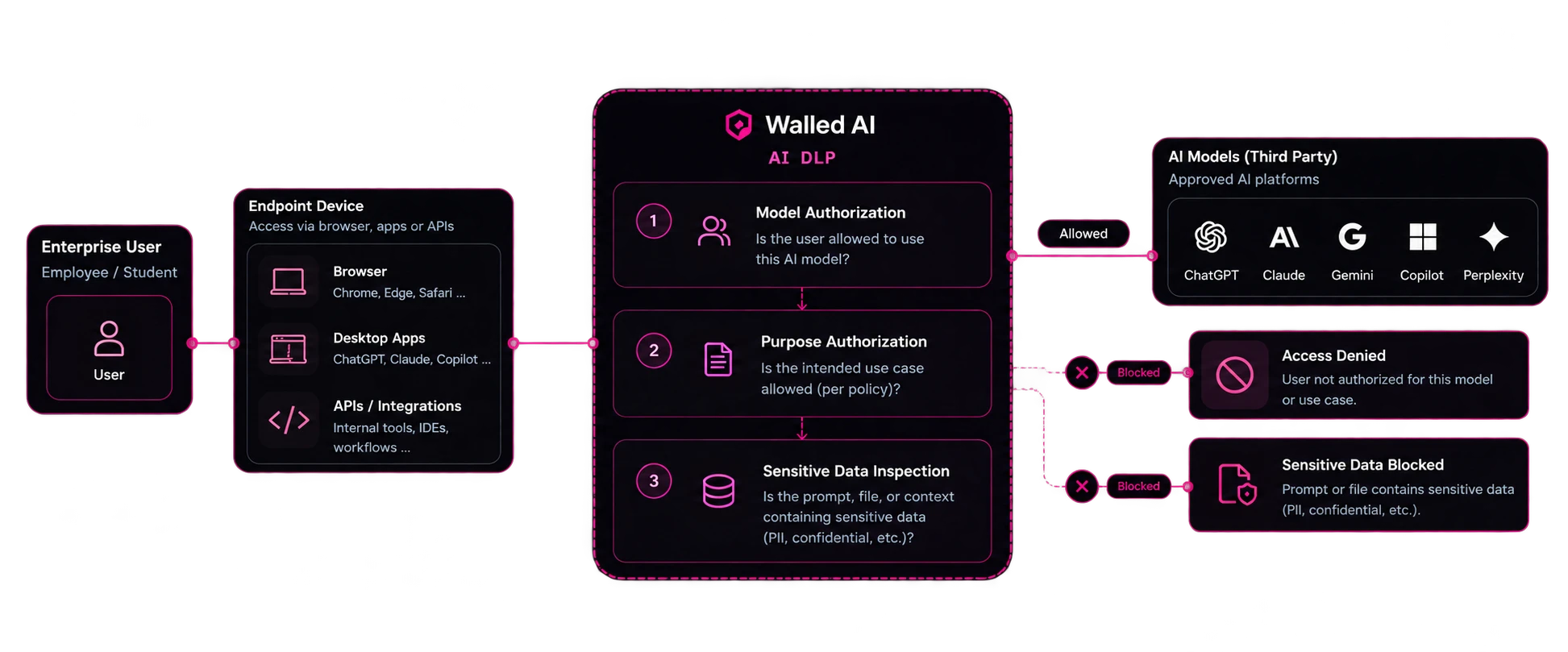
Model authorization, purpose authorization, and sensitive data inspection - inline, before the request reaches any model.
Trusted By




Traditional DLP doesn't solve AI data exposure
Your traditional DLP system has never read a single AI prompt. Meanwhile, an average employee writes hundreds of prompts everyday.
Depending on their role, employees share client records, contracts and source code with third-party LLMs and AI systems. Traditional DLP simply wasn't built to handle this. When it does intercept AI, it either bans the tool outright, or waves every prompt through unexamined. Neither is governance, and no amount of tuning turns one into the other.
Traditional DLP is
Ban the tool, or allow everything. Its only lever at the AI boundary is the whole destination. Blanket bans just move the work to a personal laptop.
Walled AI's 3-step AI DLP is the Upgrade You Need
Our AI DLP sits between the endpoint and the LLM model provider. Every request passes three comprehensive checks to ensure complete data security.
Model Authorization
Is this user allowed to use this AI model?
The first question isn't what's in the prompt - it's whether this person should be talking to this model at all. Entitlements come from your identity provider and org structure, so a contractor, an analyst, and a CFO don't share the same set of approved platforms.
- Per-user and per-group model entitlements
- Corporate accounts distinguished from personal ones
- Sanctioned platforms only - everything else is unsanctioned by default
Purpose Authorization
Is the intended use case allowed under policy?
Access to a model is not blanket permission to use it for anything. The same employee on the same platform can be cleared to draft marketing copy and barred from running candidate screening or credit decisions, because policy is written against the use case, not just the tool.
- Use-case policies per department and role
- High-risk purposes gated or escalated for review
- Policy version recorded with every decision
Sensitive Data Inspection
Does the prompt, file, or context carry sensitive data?
Only once the user and the purpose clear does WalledAI deep scan the payload itself. Not a pattern match on a file extension - it opens the document, reads the text inside the screenshot, parses the code, and works on meaning in context, so an unformatted customer list in the middle of a paragraph is caught as surely as a card number.
- Deep content inspection across 15+ modalities, not file types
- PII, PHI, financial identifiers, secrets, source code, and IP
- Context-aware: catches what no regex has a pattern for
Three Steps, Three Simple Outcomes
Resolve every data request to one of three possible outcomes, and log every interaction in detail. Log the request, user details, destination url, policy version, and resolution.
Allowed
User, purpose, and payload all clear. The request reaches the approved platform - ChatGPT, Claude, Gemini, Copilot, Perplexity - and the interaction is logged.
Access Denied
The user isn't authorized for this model, or the use case isn't permitted under policy. The request stops at the first or second check, before any payload is transmitted.
Sensitive Data Blocked / Redacted
The user and purpose were fine, but the prompt or file carried sensitive data. The interaction is stopped - or, where policy allows, the sensitive values are masked (with Walled Redact) and the work continues.
Secure Every Endpoint and Every Route to Third-Party AI
Coverage is what separates state-of-the-art AI DLP from a simple blocklist. An employee who can't reach a model in the browser will open the desktop app; an integration that bypasses both will call the API directly. WalledAI governs all surfaces under one policy, so there is no route out that is quietly cheaper than the governed one.
Browser
Chrome, Edge, Safari and any AI web app opened in them - including sessions signed in with a personal account that never appears in a corporate SSO log.
Desktop apps
ChatGPT, Claude, Copilot and other native AI clients that run outside the browser entirely, where a web proxy or domain blocklist sees nothing useful.
APIs & integrations
Internal tools, IDEs, notebooks, automated workflows, and agents that call a model directly - governed at the gateway rather than tool by tool.
AI tools nobody registered are a separate problem - Shadow AI Detection is what finds them.
Say Goodbye to False Positives
Traditional DLP matches patterns, not meaning. A regular expression that looks for 16 digits will flag a reference number, a test ID or a phone number just as readily as a card number, and every false alert costs an analyst time to clear.
Reference numbers
A 16-digit order or reference number matches a card pattern.
Test and placeholder data
Sample values such as 555-0100 match phone patterns, so developer fixtures and documentation examples set off alerts in production.
Social Security numbers
SSNs have no built-in check digit, so any nine digits in the right shape look valid to a pattern until you read the words around them.
Context decides, not the pattern alone
WalledAI reads what the text is about, not only what it looks like. The same 16 digits next to "invoice ref" are not a card number; next to "card number, expires" they are. Because context settles most cases before an alert fires, WalledAI eliminates most false positives and analysts only see the events that matter.
Prevent Data Loss across Business Functions
AI isn't confined to a single function any more. Data loss is a real possibility across teams like sales, finance, HR, engineering and more. WalledAI governs all of them under a single policy set.
Sales & marketing
Drafting outreach, summarising calls, building proposals - with named customers, pipeline values, and unannounced pricing in the prompt.
Finance
Modelling, variance analysis, board packs - pasting unreleased results, account numbers, and counterparty terms.
HR & people
Job descriptions, review summaries, policy drafts - carrying employee names, salary bands, and performance records.
Different people, different tools, different use cases - one control plane, one policy set, and one audit trail across all of them.
And Gather the Evidence Your Regulator Needs
A data-loss incident involving personal or regulated data is a time-sensitive reportable event. AI DLP comes to your rescue by logging information about every interaction - which user, which model, which use case, which entities, under which policy.
GDPR
Lawful processing and cross-border transfer of personal data submitted to a model.
Singapore PDPA
Consent, purpose limitation, and protection obligations across AI workflows.
HIPAA
PHI masked before it reaches a model, with access logging that stands up to review.
EU AI Act
Data governance and record-keeping duties under Articles 9-15 and Article 50.
MAS TRM
Technology risk controls and audit evidence for financial institutions.
NIST AI RMF
Govern, Map, Measure, and Manage applied at runtime rather than on paper.
- SOC 2 Type II
- ISO 27001
- GDPR
- PDPA
An Entire Ecosystem Supporting AI DLP
AI DLP is an outcome, not a separate box to buy. Each check is carried by a component of the WalledAI platform, deployed together as one control plane with one policy set and one audit trail.
Enterprise RBAC
Holds the entitlements behind model and purpose authorization - which platforms each role may use, and for which use cases.
Data Classification
Tags what the payload actually contains and maps it to your sensitivity taxonomy, so inspection decisions stay consistent across every department.
Walled Redact
The alternative to blocking: masks the sensitive values so the model still gets usable context, then restores them in the response the employee sees.
Shadow AI Detection
Finds the AI tools, accounts, extensions, and agents that were never put through these checks in the first place.
Walled Protect
Guards the traffic that does get through - prompt injection, jailbreaks, and policy-violating content, on both the input and output path.
Governance Dashboard
Turns every allow and every block into an audit-grade record, exportable and mapped to the frameworks you report against.
Data Privacy Friendly Deployment Options
A loss-prevention layer that streams your most sensitive content to a third-party cloud has created more problems than it solved. WalledAI runs inside your boundary - masking maps, prompts, and audit logs included.
On-premise
Runs in your data centre. Nothing - prompts, masking maps, or logs - leaves your infrastructure.
Private cloud
Deployed in your own VPC or sovereign cloud region, under your keys and your residency requirements.
Air-gapped
Fully disconnected operation for classified, defence, and government workloads.
Legacy DLP vs AI DLP
Same category name, different problem. Here is what changes when the control is designed for the AI boundary instead of retrofitted to it.
| Dimension | Legacy DLP | WalledAI AI DLP |
|---|---|---|
| Decision it can make | Ban the destination, or allow it | Allow, block, or mask - per request, not per tool |
| Depth of inspection | Pattern match on known file formats | Deep scan of prompts, documents, images, code, and context |
| Unit of inspection | Files and attachments leaving an endpoint | The payload of every AI request, in any format |
| Who may use which model | Not modelled at all | Model authorization per user, role, and account type |
| What it may be used for | Not modelled at all | Purpose authorization against your use-case policy |
| Endpoint coverage | Browser traffic, via domain lists | Browser, desktop apps, and APIs or integrations |
| Productivity impact | Bans push the work onto personal devices | Masking keeps the work flowing with the data removed |
| Evidence produced | Connection and file logs | Per-interaction record: entities, policy version, decision |
| Deployment boundary | Mostly vendor cloud | On-premise, private cloud, or fully air-gapped |
Bridge the Gap between Traditional DLP and AI DLP
Deploy on-premise, in your private cloud, or fully air-gapped - and see every request your policy would have caught.
Learn More about AI DLP
The Complete Guide to AI Data Loss Prevention
Everything you need to know about preventing data loss in AI-powered applications, from policy design to enforcement strategies.
Common Data Leakage Risks in Enterprise AI
Learn about the most common ways sensitive data gets exposed through AI models and how to protect against each risk vector.
Compliance Requirements for AI Data Protection
Understand how AI DLP helps meet GDPR, CCPA, HIPAA, and other regulatory requirements for data protection.
You May Also Like
Walled Redact
→Multi-modal PII masking for AI prompts. Protect all sensitive data across 50+ entity types.
Walled Protect
→Real-time LLM guardrails to prevent prompt injection, jailbreaks, and goal hijacking attacks.
Walled Correct
→Validate AI responses against ground truth to reduce hallucination rates and ensure accuracy.
Enterprise RBAC
→Department-level AI access controls to manage who can use which models and for what purposes.
Data Classification
→Automatically classify data sensitivity across all AI interactions for better governance.
Governance Dashboard
→Real-time monitoring and compliance reporting across every LLM interaction in your organization.
Frequently Asked Questions
What is AI DLP?
AI DLP is data loss prevention applied to AI interactions rather than files. Every request to a model passes three checks before it leaves: model authorization (is this user allowed to use this AI model), purpose authorization (is the intended use case permitted under policy), and sensitive data inspection (does the prompt, file, or context contain PII, confidential records, credentials, or proprietary content). The outcome of every check is logged.
Why doesn't traditional DLP cover AI usage?
Traditional DLP has one lever at the AI boundary - ban the destination or allow it - and where it inspects, it matches patterns inside known file formats rather than reading what the content means. An AI interaction gives it nothing to work with: free text typed into a browser, a file dropped into a desktop app, or an API call from an internal tool. Domain-level controls can see that traffic reached an AI service, but not whether that user was authorized for that model, whether the use case was permitted, or which entities were in the payload.
What is model authorization?
Model authorization is the first check: whether this specific user is entitled to use this specific AI model at all. Entitlements come from your identity provider and org structure, so a contractor, an analyst, and a CFO can each have a different set of approved platforms - and a personal account on an otherwise approved service can be treated differently from a managed corporate one.
What is purpose authorization, and why is it separate?
Access to a model is not blanket permission to use it for anything. Purpose authorization checks the intended use case against policy, so the same employee on the same platform can be cleared to draft marketing copy while being barred from candidate screening or credit decisions. Keeping it separate from model authorization is also what lets high-risk use cases be gated or escalated without banning the tool outright.
Show all FAQsShow fewer questions
What happens when a request is blocked?
There are two block outcomes. Access Denied means the user was not authorized for that model, or the use case was not permitted - the request stops at check 1 or 2, before any payload is transmitted. Sensitive Data Blocked means the user and purpose were fine but the prompt or file carried sensitive data at check 3. Both are logged with the reason, the policy version, and the user.
Does AI DLP have to block, or can it protect the data instead?
Where your policy allows it, Walled Redact masks the sensitive values rather than stopping the request: the model receives the structure and context of the prompt with the real names, identifiers, and figures replaced by tokens, and the real values are restored only in the response the employee sees. Some data genuinely can't leave, and for that the block stands.
What kinds of data does the inspection check detect?
PII, PHI, financial identifiers such as account and card numbers, credentials and secrets, source code, contract terms and deal values, and customer or client identities - 50+ entity types across 15+ modalities. The scan is deep rather than format-based: it opens the document, reads the text inside a screenshot, parses code, and works on meaning in context, so an unformatted customer list inside a paragraph is caught as surely as a card number. Custom entity types cover anything specific to your business.
Which endpoints does AI DLP cover?
Browser sessions in Chrome, Edge, and Safari; native desktop AI clients such as ChatGPT, Claude, and Copilot that run outside the browser; and APIs or integrations - internal tools, IDEs, notebooks, automated workflows, and agents that call a model directly. All three surfaces run through the same three checks and the same policy.
How much latency does inline AI DLP add?
The three checks complete inline with under 30ms of overhead on a typical request, so enforcement happens before anything leaves your boundary without a noticeable delay for the user.
Does AI DLP work with any LLM?
Yes. WalledAI is model and vendor agnostic. The same policy applies whether the request goes to ChatGPT, Claude, Gemini, Copilot, Perplexity, Llama, Mistral, or a self-hosted model, because the checks run on the request path rather than inside the model.
Does AI DLP replace our existing DLP tool?
They answer different questions and run alongside each other. Legacy DLP makes a coarse decision about a destination - allow the channel or ban it - and inspects by matching patterns inside known file formats. AI DLP decides per request: whether this user may use this model, whether the use case is permitted, and what a deep scan of the payload finds in the prompt, document, image, code, or context. Both can feed the same SIEM and GRC workflows.
What audit evidence does AI DLP produce?
Every request is logged with the user and role, the AI model and account type, the use case, the entities detected, the policy version applied, and the outcome - allowed requests included, not just blocks. The Governance Dashboard exports this as evidence mapped to frameworks such as the EU AI Act, MAS TRM, NIST AI RMF, PDPA, HIPAA, and SOC 2.
Can AI DLP be deployed on-premise or air-gapped?
Yes. WalledAI deploys on-premise, in your private cloud, or fully air-gapped. Prompts, masking maps, and audit logs stay inside your boundary, which matters for a control whose whole purpose is preventing sensitive data from reaching third parties.